
Accessible Documents (Google Docs & Microsoft Word) — Lab (Part 2)
On this page:
- Date, Time, Venue
- Programme Description
- Learning Outcomes
- How This Module Fits the A11y Roadmap
- Target Audience
- Pre-requisites
- Class Size
- Accessibility
- Trainers
- Registration
- Pricing
- Contact
Date, Time, Venue
Date: 30 January 2026 (Friday) (Registration closed)
Time: 9:30AM to 12PM
Venue: Online (Zoom)
Missed this round?
Programme Description
This 2.5-hour hands-on virtual lab provides guided practice applying the accessibility skills introduced in Part 1: Webinar. Unlike the webinar, the lab does not revisit conceptual teaching. Instead, the session focuses on practising skills directly within Google Docs and Microsoft Word, troubleshooting real issues, and improving your own documents with facilitator support.
To support meaningful application during the lab, participants are required to complete and submit a short assignment using provided sample documents prior to the session. These assignments ensure a shared foundation and allow facilitators to prepare targeted feedback.
Participants will also have the option to submit their own work documents (e.g., reports, letters, worksheets, templates) for analysis and discussion. Selected examples may be used for collective learning, allowing the group to explore real-world challenges together in a supportive environment.
During the lab, participants will:
- work through accessibility issues surfaced from their submitted assignments
- apply clear structure using Styles, headings, lists, tables, and links
- test and refine accessibility using recommended platform tools
- troubleshoot cross-platform differences and conversion challenges
- learn from real examples contributed by the group
This session is highly interactive and centred on practical learning, peer discussion, and applied problem-solving.Participants are strongly encouraged to attend Part 1: Webinar before joining the lab.
Learning Outcomes
By the end of this hands-on lab, participants will be able to:
- Practically apply accessibility skills in Google Docs and MS Word through real document tasks
- Use Accessibility Checkers and other tools to evaluate and improve documents
- Identify and troubleshoot structural, visual, and formatting barriers
- Resolve practical challenges when converting files between platforms
- Confidently improve the accessibility of both sample documents and their own organisational content
How This Module Fits the A11y Roadmap
This is a Category 2: Platform Skills & Practice module.
The lab deepens learning by shifting from understanding what to do to how to do it through applied, real-world practice.
The pre-lab assignment and optional submission of participants’ own documents ensure relevance, meaningful feedback, and stronger skill-building.Learners should ideally attend Part 1: Webinar, or have equivalent foundational knowledge.
Target Audience
- For non-technical users who create or edit documents regularly — including educators, programme staff, operations teams, social media staff, and general professionals.
- Participants who want guided practice, troubleshooting support, and applied learning will benefit most from this lab.
Pre-requisites
- Participants should have attended Part 1: Webinar, or already understand the seven essential accessibility skills.
- Basic familiarity with Microsoft Word and Google Docs is required. This session does not teach general platform use.
Class Size
Limited to 10 pax.
There needs to be a minimum pax of 5 participants to conduct the programme. If the minimum number is not reached, you will be informed before the start of the programme to be refunded. There’s no refund of programme fees once paid, unless the programme is cancelled.
Accessibility
We are committed to creating a programme experience that is inclusive, accessible and affirming of diverse accessibility needs. Read on to find out more about the access arrangements available for this programme!
- Presenters will actively speak at a moderate pace and encourage one speaker at a time to facilitate smoother information processing
- Multiple modes of expression for processing information and responding, particularly verbal and written modes
- Breaks
- Session notes reflecting slides’ content sent before start of programme
- Programme outline sent before start of programme
- Glossary of all technical terms used in the course
- Materials provided in screen-reader-friendly formats
- Captions for all audio content
Please send in your request at least 2 weeks prior to the programme date.
- Speech-to-Text Interpreting (STTI) to be viewed on your own devices like phone or laptop.
- Singapore Sign Language interpretation.
If you require an accessibility arrangement not listed above, please contact us. We will work with you to identify a suitable or equivalent access option within our available resources.
Trainers
Nix Sang, Director, Digital Accessibility Advisor, Equal Dreams
Nix is a changemaker committed to equity and inclusion, with close to two decades of experience in disability and accessibility. She is a Certified Professional in Accessibility Core Competencies (CPACC) under the International Association of Accessibility Professionals (IAAP). With experience spanning Singapore and the USA, she brings an international perspective and deep expertise in contextualising global best practices for different institutional and cultural environments.
As the founder and director of Equal Dreams, Nix has pioneered and led the formalisation and professionalisation of key accessibility services in Singapore, including speech-to-text interpretation and visual interpretation. She specialises in disability inclusion within the higher education sector, consulting with Institutes of Higher Learning (IHLs) to build sustainable inclusion ecosystems through policy development, process design, capacity building, and strengthened support structures. Through ongoing work with the Equal Dreams team, Nix has led the organisation to grow into a trusted accessibility partner in the arts and creative sector, supporting major festivals and institutions in integrating accessibility into their work.
Dallon Au, Digital Accessibility Specialist
Dallon is a Digital Accessibility Specialist at Equal Dreams and a low-vision individual, born with congenital cataracts, he has partial vision in his left eye and no vision in his right. He recently graduated with a Bachelor of Science in Computing Science (Honours) from the University of Glasgow, UK, through a joint programme with the Singapore Institute of Technology.
One of his most impactful passion projects was his capstone thesis: a web-based solution designed to empower persons with visual impairment to independently fill and sign untagged PDF forms. This proof-of-concept combined assistive technology with intuitive form detection and signature placement features, helping address a long-standing barrier to digital independence.
Prior to joining Equal Dreams, Dallon worked as a freelance trainer at various social service agencies, where he discovered his passion in supporting the Blind and Low Vision (BLV) community. He has trained individuals to use a wide range of assistive technologies, from screen readers to mobile accessibility features, and actively advocates for inclusive design and better representation of the BLV experience in tech development.
At Equal Dreams, Dallon conducts digital accessibility accessibility checks, delivers training on accessibility standards, and continues to teach assistive technology to persons with visual impairments. His work bridges technical expertise with lived experience, driving meaningful accessibility improvements across different projects.
Beyond his current focus, Dallon is eager to deepen his understanding of other disability communities and learn how inclusive design can better serve their unique needs. Through his work at Equal Dreams, he hopes to contribute to accessibility efforts that go beyond visual impairment, ensuring more holistic solutions that reflect the full diversity of human experience.
Pricing: Pay What You Can
Introduction to the sliding scale pricing model
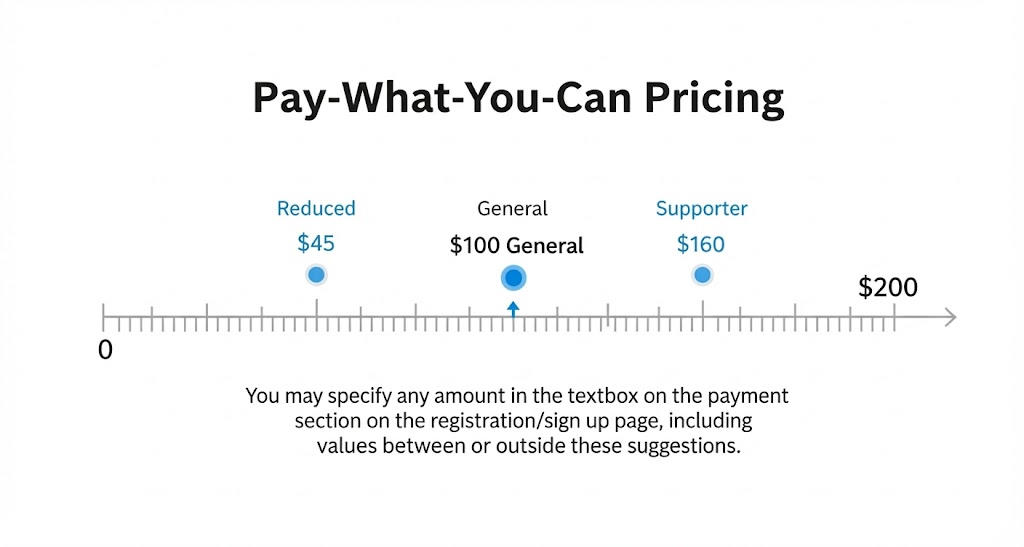
This programme uses a Pay-What-You-Can model so finances are never a barrier. The tiers below are guides only — you may enter any amount that feels right for your circumstances when you’re on the payments section on the registration/sign up page.
Those with greater financial comfort or organisational support are encouraged to contribute more as an act of solidarity.
Any contribution—higher or lower—supports equitable access and helps sustain this work.
Find out more about the ethos behind our pricing models.
Registration
Registration is now Closed!!
Can’t make it this round, but still interested?
Once you registered your interest, we will reach out to you if and when we have the next run of this programme!
Contact
For further enquiries, please contact us at training@equaldreams.sg.